


Lingvanex. Language Translator
3.967.00 Reviews
App Specs
- Version
- Varies with Device
- Updated On
- License
- Free
- Downloads
- 500,000+
- Developer
- Nordicwise Limited
- Categories
- Travel & Local
- Platform
- Android
Screenshots
 Analysis by AppCompare
I see Lingvanex Language Translator as a practical travel companion, not a substitute for a human interpreter. Its appeal is the range of ways it can help when words get in the way: you can work with typed text, speech, photos, files, and websites instead of being limited to a single translation box. That variety makes it useful for everyday travel problems, though I would still check important wording before relying on it.
One useful way to judge a translator is to ask what happens when the situation changes. At a café, you may need a quick spoken exchange; later, you may want to understand a sign or a longer piece of writing. Having several translation modes together can save the small but annoying step of switching between separate tools. The trade-off is that convenience does not make every result equally dependable: context, accents, handwriting, image quality, and specialized vocabulary can all affect what comes back.
Where the different tools earn their place
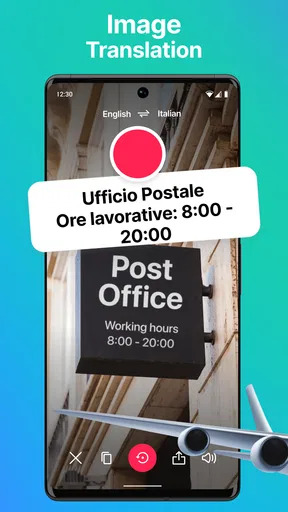
Photo translation is most helpful when copying text would be awkward, such as reading a notice on a door or checking ingredients on packaging. I would aim the camera squarely at the words, avoid glare, and make sure the writing is legible before trusting the result. If the translation seems odd, taking another photo or entering a short phrase manually gives you a useful cross-check. A camera result is a starting point for understanding, not proof that every detail has been read correctly.
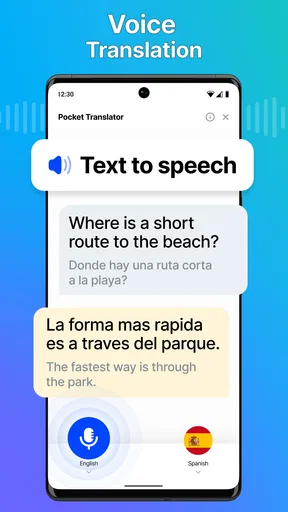
Voice translation fits brief, practical exchanges better than complicated conversations. I would keep each turn short, pause between speakers, and use familiar wording rather than an idiom or a joke. That gives the app a cleaner sentence to work with and makes it easier to notice if the translation misses the point. For a sensitive conversation, a medical explanation, or a contract discussion, I would not treat an automated spoken result as the final authority.
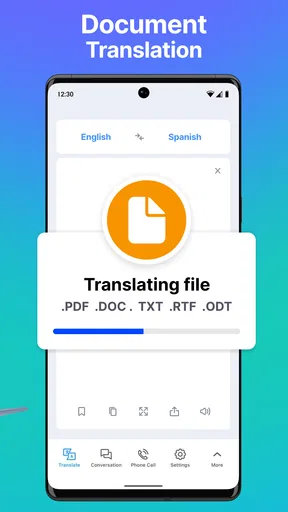
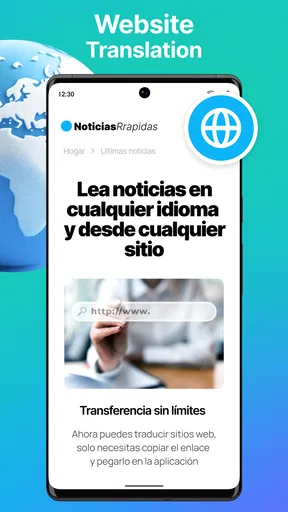
Files and websites widen the app’s usefulness beyond the moment-to-moment needs of a trip. They can help you get the gist of travel instructions, a page about a local service, or a document you need to understand before taking action. I would still review names, dates, amounts, and any instructions that could affect a booking or payment. A fluent-sounding translation can hide a small but important mistake, especially when the source uses formal or technical language.
A travel day that shows the trade-offs
Picture arriving in a place where you do not speak the language, finding a sign you cannot read, and then needing to ask a driver where to meet. I would use the camera for the sign, type a short question if I need to make it precise, and try voice translation for the quick exchange. That sequence uses the app’s different modes for what each does best rather than expecting one feature to handle everything. If the meeting point matters, I would also show the translated text on screen so the other person can check it visually.
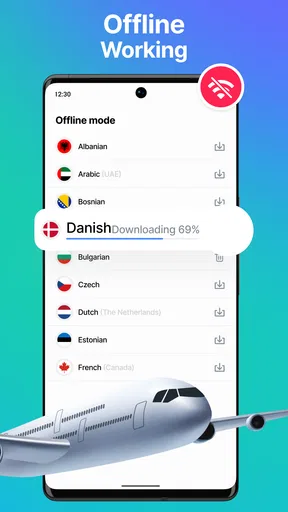
Offline translation is especially valuable when a connection is unreliable, but I would prepare before leaving dependable Wi-Fi. Check that the language support you need is available for offline use and make any required downloads in advance; do not wait until you are underground, abroad, or out of data to discover that you need a connection. Offline access is a backup for practical moments, not a guarantee that every translation mode or every language will behave exactly as it does online.
Worth Reading Before You Choose

EA SPORTS FC Mobile 26 Is a Bigger Football Game, but It Takes Time

Flipboard Shows What News Apps Must Do Beyond the Feed

Switching to Android Auto Means Rethinking Your Driving Routine

Google Calendar Makes a Crowded Week Easier to Manage

Ludo King Makes the Most of the Minutes Between Plans

Baby Panda World Brings Quick Play to Modern Phones, but Its Game Library Feels Busy
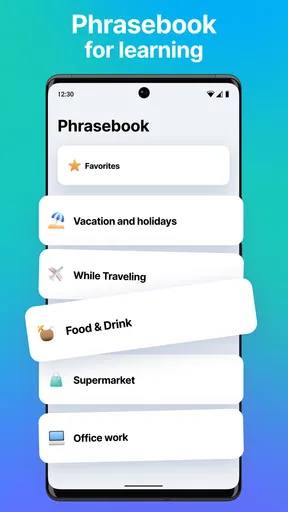
The same preparation helps with a phrasebook. I would save or rehearse a few basics before the trip—greetings, directions, and a polite request—rather than trying to compose every sentence under pressure. A phrasebook is most useful for recurring situations where a short, familiar expression is enough. For a detailed question, a specific place name, or a response that changes the conversation, I would switch back to typed or voice translation and check that the meaning still fits.
How it compares with a single-purpose translator
Compared with a basic text-only translator, Lingvanex has a broader job: it brings several kinds of input together, which is handy if your needs shift between signs, speech, and written material. A built-in phone translation option may be quicker for a one-off phrase, while a dedicated translation service may suit someone who already prefers its language tools or workflow. I would choose Lingvanex when having these modes in one place matters more than keeping the process as minimal as possible.
It is also worth separating translation from language study. The app can help you look up vocabulary or hear a translated phrase, but that is not the same as a structured course that teaches grammar, tracks progress, and makes you practice recall over time. I would use it as a companion while learning, especially for checking a phrase in context, rather than expecting it to build fluency by itself.
Who is likely to get the most from it
I think it suits travelers who want one flexible tool for signs, menus, short conversations, and quick reading, as well as people who regularly encounter material in another language. It can also help a student check a sentence or understand the gist of a page, provided they verify anything where accuracy matters. The app is free to start, is rated for Everyone, and has optional in-app purchases; I would explore the everyday workflow first and decide whether any paid option is worth it for my own use.
Someone who needs legally precise wording, dependable interpretation for a medical appointment, or polished professional localization should choose a qualified person or a specialist service instead. I would also skip it if all I wanted were occasional, simple text translations and my phone’s existing tool already handled those well. A rating of 3.9 from around 2.8 thousand ratings suggests a mixed but substantial body of user feedback, so I would treat it as a reason to try the app for my own languages and tasks rather than as a promise of a perfect result.
As a Travel & Local app from Nordicwise Limited, Lingvanex has a clear practical role: it helps me get through ordinary language barriers with more than one kind of input. It has been available since October 2017 and has passed 500 thousand installs, which gives it a meaningful presence without changing the basic advice: test the languages and modes you expect to use before depending on them. The current version can matter to compatibility and interface details, so I would check the app’s page on my device before planning around a particular feature.
The main question many people have is whether it works without internet. It offers offline translation, but I would prepare by checking language availability and downloading what I need in advance. Another practical question is whether voice or camera translation can be trusted for every conversation or image; I would use them for low-stakes help and confirm anything consequential. And if I only need a quick phrase, I would compare the effort with the translator already on my phone rather than assuming a separate app is automatically better.
So, I recently got my hands on the Lingvanex Language Translator app, and let me tell you, it’s like having a personal interpreter in your pocket. Whether you're traveling the globe or just trying to decode that mysterious text from your foreign friend, this app is here to save the day.
Getting Started with Lingvanex
First things first, downloading and setting up Lingvanex Language Translator is a breeze. Available on both Android and iOS, you can grab it from the Play Store or App Store and be translating in no time. The interface is sleek and intuitive, so even if you’re not tech-savvy, you’ll find your way around easily.
Features That Stand Out
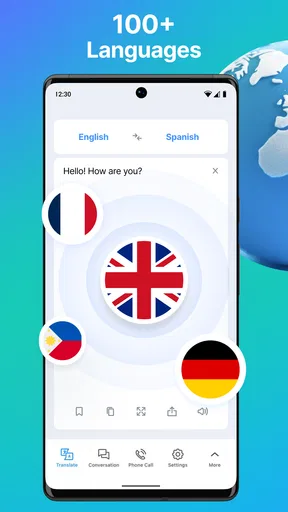
Let’s dive into what makes this app tick. It supports an impressive number of languages — over 100, to be exact. You can translate text, voice, and even images. Yes, you heard me right. Just snap a pic of that foreign menu or street sign, and Lingvanex will translate it for you. Mind-blowing, right?
The voice translation feature is another game-changer. Imagine having a conversation with someone in a completely different language, and you both understand each other. It’s like magic. The app records your voice, translates it, and plays it back in the target language. It’s super handy for real-time conversations. Real-time translation is a huge plus.
Performance and Usability
In terms of performance, Lingvanex is pretty smooth. Translations are fast and generally accurate. Sure, like any translator, it can sometimes trip over idioms and slang, but it does a decent job most of the time. The app also offers offline mode, which is a lifesaver when you’re in a no-service zone or trying to save on data usage.
Usability-wise, the app is straightforward. The main screen gives you easy access to text, voice, and camera translations. Plus, there’s a handy phrasebook feature for those common expressions you might need on the fly. Whether you need to ask for directions or order a coffee, this app’s got your back.
Why You Might Love It
There are plenty of reasons to fall for Lingvanex. It’s perfect for travelers, expats, or anyone dealing with foreign languages in their everyday life. The seamless integration of text, voice, and image translations makes it versatile. Plus, being able to translate offline is a big win when connectivity is an issue.
If you’re learning a new language, this app can be a fantastic companion. You can practice pronunciation, learn new vocabulary, and even translate entire documents. It’s like having a language tutor on demand. Language learning has never been this accessible.
Final Thoughts
In conclusion, Lingvanex Language Translator is a solid choice if you’re looking for a reliable translation app. It’s packed with features, easy to use, and covers a wide range of languages. Whether you’re a globe-trotter, a student, or just curious about languages, this app can be a valuable tool in your arsenal.
So, if you’re ready to break down language barriers and explore the world without limits, give Lingvanex a try. Who knows, you might just find yourself speaking like a local!
Pros
- Supports multiple languages for translation.
- User-friendly interface with intuitive navigation.
- Offline translation feature available.
- Voice translation for hands-free use.
- Text-to-speech functionality included.
Cons
- Occasional inaccuracies in complex translations.
- Requires internet for some features.
- Ads can be intrusive in free version.
- Limited free usage before subscription.
- Pronunciation can vary for some languages.
FAQs for Lingvanex. Language Translator
What languages does Lingvanex support?
Lingvanex supports a wide range of languages, covering over 100 different options. This includes widely spoken languages like English, Spanish, and Mandarin, as well as less common languages. This extensive support makes it ideal for users who need to translate text, voice, or documents between various languages.
Can Lingvanex work offline?
Yes, Lingvanex offers offline translation capabilities. Users can download language packs in advance, allowing them to access translation services without an internet connection. This feature is particularly useful for travelers or individuals in areas with limited connectivity, ensuring that language barriers are minimized at all times.
How accurate are Lingvanex translations?
Lingvanex uses advanced neural network algorithms to enhance translation accuracy. While machine translations are continually improving, they may not always be perfect. Users can expect high-quality translations for most common phrases and sentences, but idiomatic expressions and complex sentences might require some human interpretation.
Is Lingvanex secure for translating sensitive information?
Lingvanex takes user privacy and data security seriously. The app uses encryption to protect your data during transmission. However, for extremely sensitive information, it's advisable to be cautious and consider additional security measures, as no app can guarantee absolute privacy against all potential vulnerabilities.
Does Lingvanex offer any additional features besides translation?
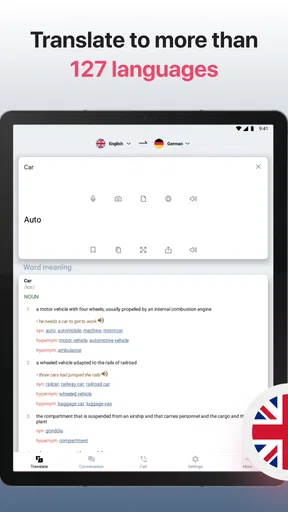
Beyond basic translation, Lingvanex includes features such as voice-to-text conversion, real-time conversation translation, and document translation. It also offers a dictionary feature, providing definitions and examples for words. These additional tools make it a comprehensive language solution for both personal and professional use.


